Every centre in one place
In UPRISE your business is a single nursery with as many branches as you operate, and each branch has its own classes, staff and children. As the owner you look across all of them on the web dashboard; a branch admin looks after their own branch. Nothing needs merging at the end of the month, because the records were never kept apart in the first place.
From the owner's seat you can see, for every branch:
- children's attendance records;
- staff attendance, with late arrivals, overtime and early leave;
- staff vacations;
- orientation visits booked by prospective families;
- bills drafted and waiting for your review.
The dashboard runs in any web browser, in English or Arabic (right to left), with light and dark mode, so there is nothing to install on the office computer.
Owner analytics: the numbers behind the business
Owner analytics turns the records your team keeps every day into charts, so you don't have to build reports in a spreadsheet. The charts cover:
- Attendance: how many children are actually coming in.
- Enrolment: whether the number of children is growing or slipping.
- Late checkouts: whether late collection is becoming a habit.
- Photo and video uploads: a quick read on how actively classes are sharing the day with families.
- Orientation bookings: how many families are coming to look around.
- Money: the financial side of the same picture.
Read together, they answer the questions owners actually ask: are visits turning into enrolments, is the team keeping parents engaged, and is the business heading the right way? The owner analytics page explains each chart.
Staff attendance you can rely on
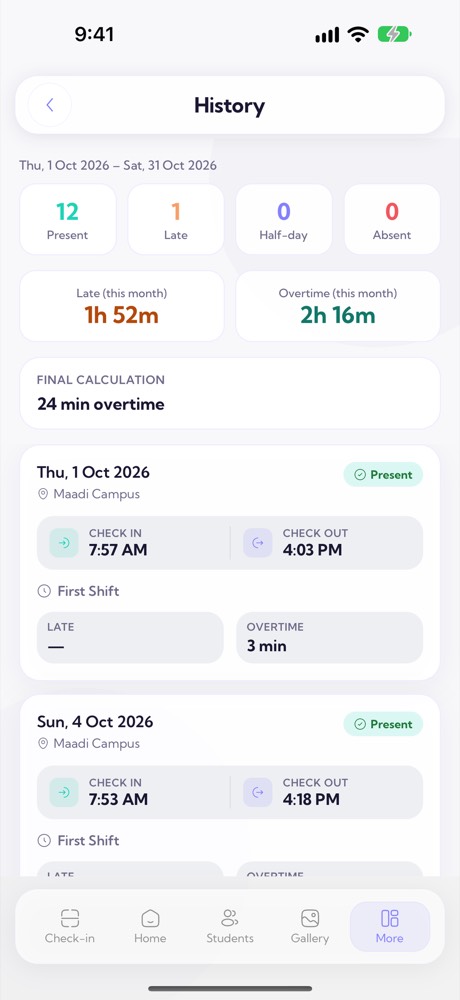
In childcare, the people are the service. Staff clock in and out by scanning their branch's QR code in the UpriseEdu Staff app, so the record shows where someone clocked in as well as when. The dashboard shows late arrivals, overtime and early leave for each person, with staff vacations recorded alongside, and a month can be checked without collecting a single timesheet.
Staff see their own figures too. Each person's Staff app shows their monthly attendance: days present, late arrivals and overtime. When both sides are looking at the same numbers, the month-end conversation is short and rarely a surprise. More on attendance tracking.
A role for every job in the building
A childcare centre is more than its teachers. UPRISE has a role for each staff job: owner, branch admin, teacher, assistant, nanny, security, cook and doctor. Everyone signs in with their own account and works in the app that suits the job: owners and branch admins on the web dashboard, everyone else on the Staff app on a phone or tablet.
Roles keep a growing organisation tidy. A branch admin runs their own branch day to day, and owner analytics stays with the owner. When someone joins, they get the role for their job instead of borrowing someone else's login.
Switch features on branch by branch
Not every centre needs every tool on day one. Features are switched on or off per branch, so you can open a new branch with attendance and daily updates and add pickup requests or billing once the team has settled in, or trial something at one centre before rolling it out to the rest. Some features in the parent and staff apps follow those switches, so each branch's families and team work with what that branch has turned on.
Branches also keep their own rules where they differ. Each one sets its own grace period and charge for late checkout, so a centre with a later closing time isn't held to the rules of another.
Billing families, with the owner in control
Families are billed per child: a main subscription that can be monthly, half-month, weekly or daily, add-ons such as late checkout, and a discount for any child who has one. Every bill starts as a draft and is approved by the nursery before it reaches a parent, so no figure goes out that nobody has checked. Payments are recorded as they arrive: cash, card at the nursery, or a bank-transfer receipt the parent sends from the app, which your team reviews. The money chart in owner analytics then shows how the business is doing overall. See billing and invoicing for the full flow.
Growing from one centre to several
Adding a centre means adding a branch to the nursery you already have, with its classes, staff and settings, rather than starting a second system and a second set of logins. Families at the new branch use the same UpriseEdu parent app, available on the App Store and Google Play. Parents looking for childcare can find each of your branches in that app and book an orientation visit, and the dashboard gathers bookings in a calendar and gives you a booking link to share with families who don't have the app yet.
Owner features in detail
Childcare management software questions
Can a branch admin see the other branches?
Branch admins work within their own branch. Owners see every branch, and owner analytics is for the owner only.
Can I start with one centre and add more later?
Yes. New centres are added as branches of the same nursery, so their records, staff and families sit alongside the ones you already have.
Which staff roles are there?
Owner, branch admin, teacher, assistant, nanny, security, cook and doctor. Owners and branch admins use the web dashboard; the other roles use the UpriseEdu Staff app.
Do I need to install anything to use the dashboard?
No. The owner dashboard runs in a web browser, in English or Arabic, with light and dark mode.
Can childcare centres outside Egypt use UPRISE?
Yes. Talk to us and the team will set up your nursery with you.
See your whole childcare business on one screen
Tell us how many centres you run and how you keep track of them today, and we will show you the owner's view in UPRISE.