One system, three apps, one record of the day
Most nurseries run on a patchwork: a paper register by the door, a messaging group for parents, a spreadsheet for fees and a folder of photos on someone's phone. A nursery management system replaces the patchwork with one place where the day is written down once and seen by everyone who needs it. In UPRISE that place is shared by three apps, each built for the people holding it:
- The owner dashboard (web), for owners and branch admins: attendance for children and staff, announcements, chat, photo approval, orientation visits, billing and analytics.
- UpriseEdu Staff (phone and tablet, iOS and Android), for teachers, assistants, nannies and every other role in the building: check-in, activity logs, photos, child profiles and pickup requests.
- UpriseEdu (iPhone and Android), for parents: their child's day as it happens, photos, learning, pickup and bills.
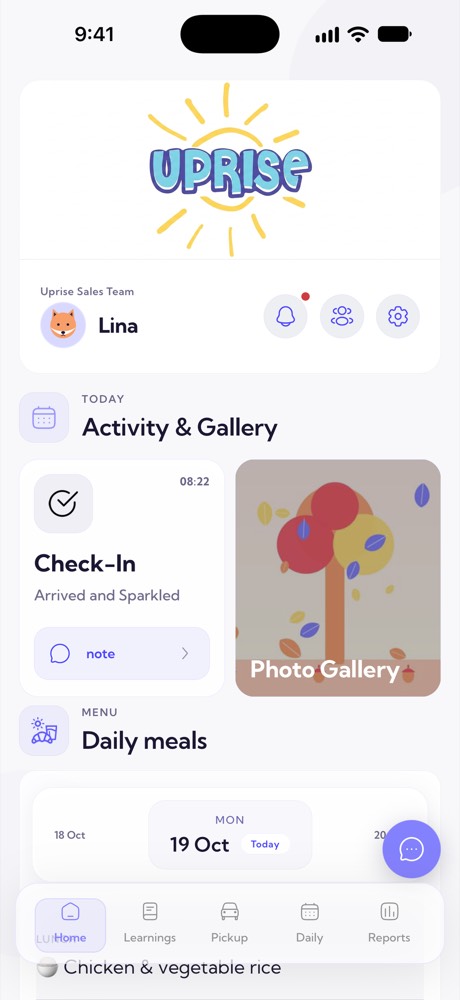
When a teacher taps a child in, the parent sees the arrival time and the record lands on the dashboard. Nobody copies the register into a spreadsheet in the evening, because the register and the record are the same thing.
A nursery day, from drop-off to pickup
The easiest way to see what a nursery management system does is to follow one ordinary day and watch who records what, and who gets to see it.
Before the doors open
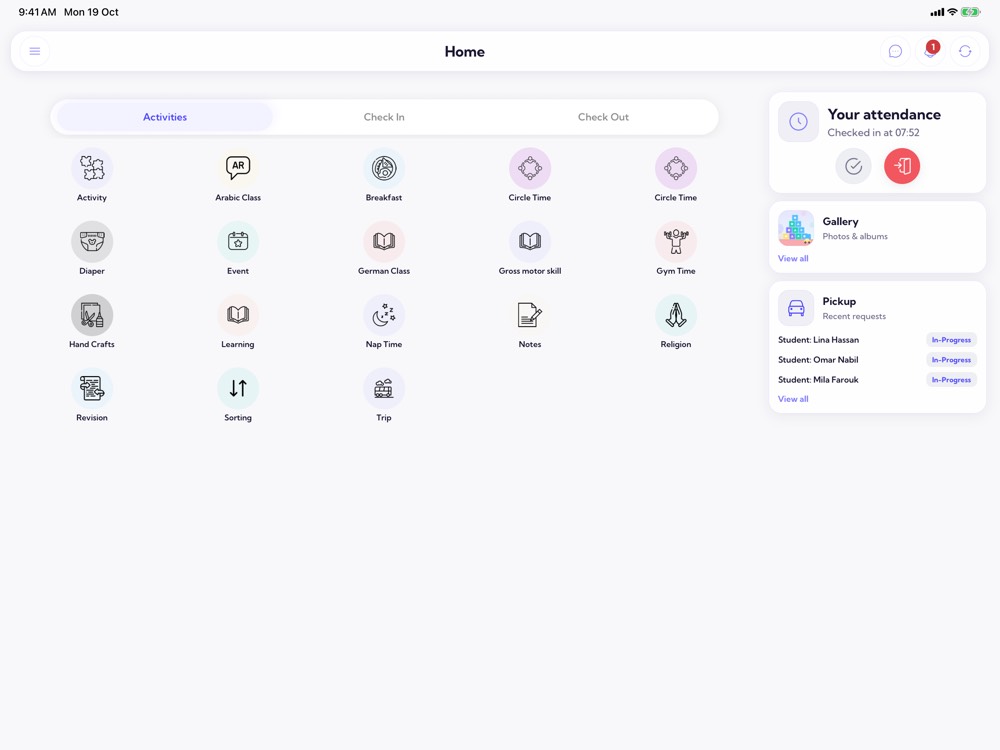
Staff clock in at the door by scanning the branch's QR code in the Staff app. Their arrival time goes straight into the staff attendance record, so a manager opening the dashboard can see who is in, who is running late and who is on leave, without a signing-in sheet to chase.
Drop-off
As each child arrives, a member of staff checks them in with one tap. The parent app shows the check-in with the exact arrival time, which answers the most common morning worry ("did she get there all right?") before anyone has to pick up the phone. Children's attendance builds up on the dashboard and in each family's attendance history.
Morning in the rooms
The class's daily schedule sits in the Staff app, so whoever is covering a room knows what comes next. As the morning goes on, teachers log each activity with a short note: circle time, a craft table, garden play. Photos and videos taken along the way are filed into albums by activity and date. If the Wi-Fi drops, the app keeps the photos on the device and uploads them by itself once the connection is back.
Lunch and nap time
Meals and naps are logged the same way, with a note where it matters ("finished all her rice", "slept for an hour"). Parents can look up the day's meal menu in the app whenever they like, and the daily report fills in as the team logs, rather than being written up at home time.
Afternoon: approvals and messages
You decide what families see. Owners and branch admins can switch on approval and check photos and videos on the dashboard before parents see them, which keeps the nursery in charge of what is shared. Questions from parents come in through chat instead of a teacher's personal number, and announcements go out from the dashboard as notifications.
Pickup
A parent schedules the pickup in the app and chooses who is collecting today: themselves, a grandparent, a family driver. The request carries its own verification code, staff see it in the Staff app, and the parent can follow it until their child has been handed over. Check-out is recorded with the time, so a late collection is on record too.
After the last child leaves
By the time the lights go off, the owner's picture of the day is already complete: who attended, which staff arrived late or stayed on, which photos went out, and which orientation visits are booked for tomorrow. There is no end-of-day write-up left for anyone to type.
What owners, staff and parents each get
Owners and branch admins
The dashboard holds the set-up of the nursery itself as well as the daily records: branches, classes, a role for each staff job, which features each branch uses, late-checkout grace periods and charges, and billing for families. It works in English and Arabic, right to left in Arabic, in light or dark mode.
The nursery team
Every staff role uses the same Staff app, on a phone or a tablet. Each child's profile keeps parent contacts, medical information and progress together, and staff record medical assessments and accident reports in the same place they log the rest of the day.
Parents
Families get one calm place for their child's day in the parent app: check-in, the daily report, meals, photos, learning activities, progress reports, pickup, chat and bills, in English or Arabic. Parent accounts are created by the nursery, so only families you have added can sign in. UpriseEdu is on the App Store and Google Play.
Signs your nursery has outgrown paper and group chats
- The morning register is on paper and the office types it up later, when there is time.
- Parents message teachers' own phones to ask whether their child has eaten or slept.
- Photos sit in staff camera rolls, and nobody is quite sure which ones went to which family.
- Pickup changes arrive as a phone call, and whoever is at the door has to remember who is allowed to collect.
- Staff lateness is noticed but never written down, so it doesn't come up at the end of the month.
- Fees live in a spreadsheet that only one person really understands.
If several of these sound familiar, moving the day into a nursery management system saves time every single day, not only when the month closes.
Setting UPRISE up for your nursery
There is no sign-up form and nothing to configure on your own. You tell us about your nursery, our team sets up your branches, classes and staff roles with you, and you choose which features each branch starts with. Staff install UpriseEdu Staff, families install UpriseEdu, and everyone signs in with the account the nursery creates for them. More features can be switched on later, branch by branch, once the team is comfortable.
Explore each part of the day
Nursery management system questions
What is a nursery management system?
It is software that records the nursery day (attendance, activities, meals, naps, photos, pickups and fees) and shares it with the people who need it. In UPRISE it is three connected apps: a web dashboard for owners and branch admins, UpriseEdu Staff for the team and UpriseEdu for parents.
Do staff need their own phones or tablets?
Either works. UpriseEdu Staff runs on phones and on tablets, on iOS and Android, so you can pick the set-up that suits your rooms and your team.
Can parents sign up by themselves?
No. Parent accounts are created by the nursery, so only families you have added can see your children's day. Before they join, families can browse nurseries in the app and book an orientation visit.
Can nurseries outside Egypt use UPRISE?
Yes. Talk to us and the team will set up your nursery with you.
Does it work in Arabic?
The parent app and the owner dashboard work in English and Arabic, and the dashboard switches to a right-to-left layout in Arabic.
Can we start with only some of the features?
Yes. Features are switched on or off per branch, so you can begin with attendance and daily reports and add the rest when your team is ready.
See how your nursery day would look in UPRISE
Tell us how your nursery runs today and we will walk you through the same day in the three apps.