Why the learning side gets lost in admin software
Most management software for early years settings is built around the office: registers, invoices, staff hours. The classroom work that parents care about most ends up in a folder sent home at the end of term, or in a photo with no explanation of what it shows. Teachers know exactly what each child is working on; parents mostly hear "we did painting today".
UPRISE closes that gap without asking teachers to write more than they already do. What happens in the classroom is recorded as it happens, then shared with families in a form they can understand and use.
Classroom learning activities that carry on at home
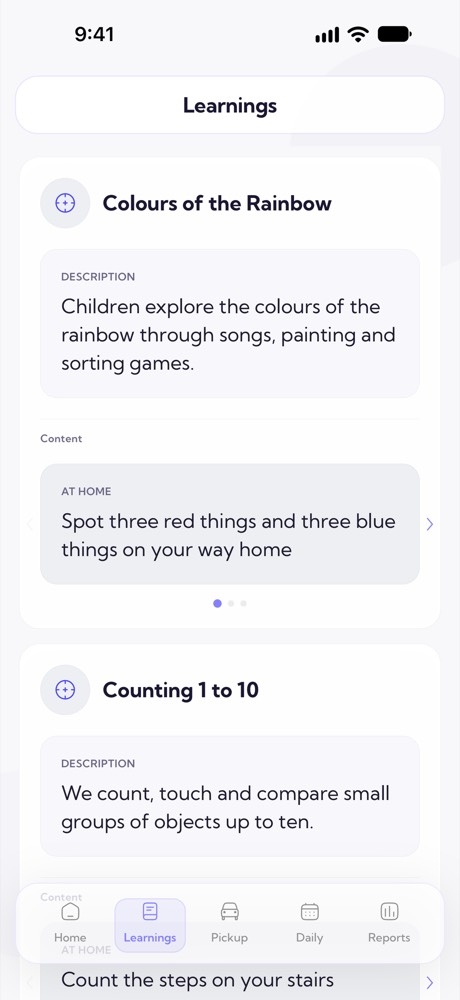
Each class's learning activities appear in the UpriseEdu parent app as short cards: what the children are exploring and how, followed by a few ideas to try at home. A topic on colours might suggest spotting three red things and three blue things on the walk home. A counting topic might suggest counting the stairs together at bedtime.
The ideas are small on purpose. A parent can read one in the car park and use it the same evening, and the child hears the same words at home that they heard in class. For parents who work long hours, it is the easiest way to feel part of what happens in the classroom, and it needs no meeting, worksheet or login beyond the app they already use.
Progress reports and skills checks parents can read
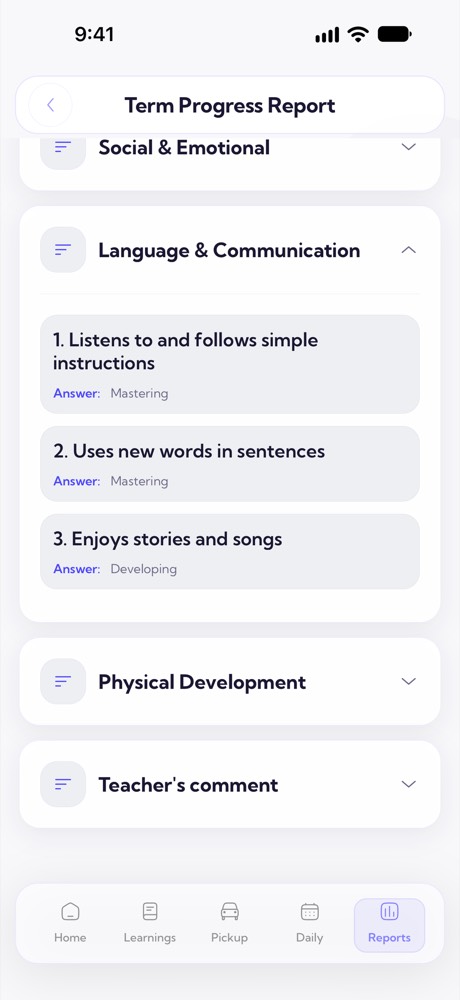
Teachers fill in progress reports and skills checks in the UpriseEdu Staff app, on a phone or a tablet, and families read them in the parent app. A report can be grouped into areas of development, each statement answered with a level and the whole report closed with a comment from the teacher. A parent can see at a glance where their child is confident and where they are still developing.
Because reports live in the app rather than on paper, they don't get lost at the bottom of a school bag. In the Staff app, each child's profile keeps their progress next to parent contacts and medical information, so a new teacher or a covering assistant can catch up on a child before the morning starts.
Everyday observations instead of end-of-term guesswork
A fair report draws on what the teacher noticed all term, not on what they can remember the week it is due. In UPRISE the everyday record builds up as staff log activities with notes during the day: who joined in at circle time, who tried the climbing frame for the first time, who counted to ten without help. Photos and videos are taken in the app and filed in albums by activity and date, so a picture of a sorting game sits under that activity instead of being lost in a camera roll.
Parents see those notes in the daily report and those pictures in the photo albums, which gives them something specific to talk about over dinner. "Tell me about the sorting game" gets a much better answer than "What did you do today?"
Keeping parents involved in learning, not just informed
Being told what happened is not the same as taking part. These are the parts of UPRISE that turn parents from readers into partners:
- Ideas for home with every learning activity, so joining in doesn't depend on a parents' evening.
- Chat with the preschool team, for a question about a report or a worry about a friendship that is better raised early.
- Instant notifications when something new is shared, so reports and albums are actually opened.
- English and Arabic in the parent app, for families who read more comfortably in one or the other.
- Orientation visits for families still choosing: they can find your preschool in the app and book a visit, and the dashboard keeps a calendar of bookings plus a link you can share with families who don't have the app yet.
Families download the parent app from the App Store or Google Play and sign in with the account the preschool creates for them.
Your curriculum stays yours
UPRISE is not a curriculum, and it doesn't tell your teachers what to teach. Whether your preschool follows a national early years framework, a play-based approach or a programme of its own, your team keeps planning the way it does now. UPRISE is where the results are recorded and shared: the activities each class is working on, the observations made along the way and the reports at the end of the term.
The admin is still covered
Learning first doesn't mean the office is forgotten. The same system checks children in and out, records staff clock-ins with the branch's QR code, handles pickup requests with a verification code, lets the preschool approve photos before parents see them, and bills families for their child's place. Teachers handle the classroom side from the Staff app and the office handles approvals and bills on the web dashboard, so the learning record and the daily admin never live in two separate systems.
Learning-side features in detail
Preschool management software questions
Can teachers write progress reports on a tablet?
Yes. Progress reports and skills checks are filled in from UpriseEdu Staff, which runs on tablets and phones, on iOS and Android.
Does UPRISE come with a curriculum or ready-made activities?
No. Your team shares its own learning activities and its own ideas for home. UPRISE records and delivers them; it doesn't replace your teaching approach.
How do parents get the learning activities?
They appear in the UpriseEdu parent app for their child's class, alongside the daily report, photos and progress reports, so there is nothing extra to install or remember.
Can parents read reports in Arabic?
The parent app works in English and Arabic. Report statements and comments appear as your teachers wrote them.
Can preschools outside Egypt use UPRISE?
Yes. Talk to us and the team will set up your preschool with you.
Give your preschool's learning a place parents can see
Tell us how your teachers plan and report today, and we will show you how it would look for your families in UPRISE.