Check-in and check-out without a clipboard
The sign-in clipboard by the front door causes the same headaches at every center: entries nobody can read, missing times, and a director rebuilding the day from it on Friday afternoon. With UPRISE, your staff check each child in and out with a single tap in the UpriseEdu Staff app, on a phone or a tablet at the door.
Each tap records something useful:
- Arrival time, which the parent sees as a check-in confirmation in the UpriseEdu app.
- Departure time, stamped at check-out, so the record shows how long each child actually stayed.
- An attendance history that parents can open for their own child and directors can review for every child on the web dashboard.
Your employees' hours are captured the same morning. Staff clock in and out by scanning the branch's QR code, and the dashboard lists late arrivals, overtime and early leave per person. The attendance tracking page goes through both sides in detail.
Late pickups, grace periods and late fees
Every daycare has a closing time, and every daycare has families who sometimes miss it. In UPRISE each branch sets its own late-checkout grace period and charge. Because check-out carries a time stamp, a late pickup is a fact in the record rather than a front-desk memory, and late checkout can appear on the family's bill as an add-on instead of becoming an awkward conversation in the parking lot.
Billing parents: drafted, reviewed, approved, sent
Billing is where daycare tools tend to do either too much or too little. UPRISE keeps the director's hand on every bill before a parent sees it:
- Every child has a main subscription: monthly, half-month, weekly or daily, to match how your center charges tuition.
- Add-ons, such as late checkout, sit on top of the subscription.
- Bills are drafted for you. Your team checks them, applies any discount for that child, and approves them.
- Approved bills are sent, and parents see them in the UpriseEdu app.
- Payments arrive the way your families already pay: cash, card at the center, or a bank-transfer receipt the parent sends from the app, which your staff review before it counts.
UPRISE does not charge cards or collect money on its own. Your office records each payment or reviews each receipt, so the books match what actually came in. More on the billing and invoicing page.
Parent updates that don't depend on one teacher's phone
At pickup, most parents want answers to three questions: did my child eat, did they sleep, and was it a good day? When those answers live in a teacher's personal text messages, they stop the moment that teacher is out sick. In UPRISE they live in the center's system instead:
- Daily reports fill in through the day as staff log activities, meals and naps with notes.
- The meal menu for the day is in the app, so the "what's for lunch?" question answers itself.
- Photos and videos are organized into albums by activity and date, and the director can approve them before families see them.
- Chat connects parents with the center team, not with a staff member's own number.
- Instant notifications tell families when something new has been shared.
- Medical assessments and accident reports are recorded by staff and shared with the parent, so an incident is documented properly rather than mentioned in passing at the door.
See how the daily reports come together.
Safe pickup: the right adult, every time
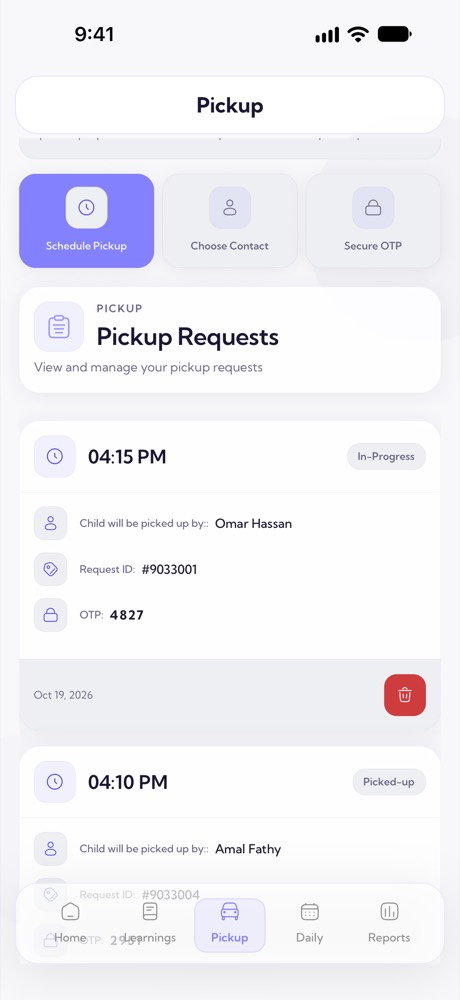
Release procedures at most centers rely on a printed list at the front desk and staff who recognize faces. That works until a parent sends a grandmother, a neighbor or a new sitter on a day the usual teacher is off. UPRISE turns each pickup into a request that everyone can see:
- The parent schedules the pickup in the UpriseEdu app and chooses the authorized person.
- The request gets its own verification code, which the person collecting can be asked for at the door.
- Staff see the request in the Staff app and update it as the pickup happens.
- The parent follows the status until their child has been handed over.
Because the request names the adult the parent chose, your staff are checking against something written down, not against memory. The safe pickup page shows each step.
Getting your center live
You won't find a self-serve sign-up page. Contact us, and our team works with you to add your center, classrooms, staff and each child's subscription. Your staff then install UpriseEdu Staff, and parents install UpriseEdu from the App Store or Google Play and sign in with the account your center created for them. Features are switched on per branch, so you can open with check-in and parent updates and add billing and pickup requests once staff have the routine down.
Daycare features in detail
Daycare management software FAQ
Can parents pay their bill from the app?
Parents see their bills in the UpriseEdu app and can send a bank-transfer receipt from it for your staff to review. Cash and card payments taken at the center are recorded by your team. UPRISE does not process card payments online.
Can staff check children in on a tablet?
Yes. UpriseEdu Staff runs on tablets as well as phones, on iOS and Android. Each staff member signs in with their own account, and teachers check in the children of the classes they teach.
What if someone who isn't on the pickup request shows up?
Your release policy still applies. The request shows the person the parent chose, so staff can see right away that this adult isn't the one named and reach the parent through chat before releasing anyone.
Can I see late pickups and staff overtime?
Yes. Late checkouts are recorded against your branch's grace period, and the dashboard shows staff late arrivals, overtime and early leave for each person.
Can daycare centers outside Egypt use UPRISE?
Yes. Talk to us and the team will set up your center with you.
Run your daycare center from one system
Tell us how check-in, billing and pickup work at your center today, and we will show you the same routine in UPRISE.